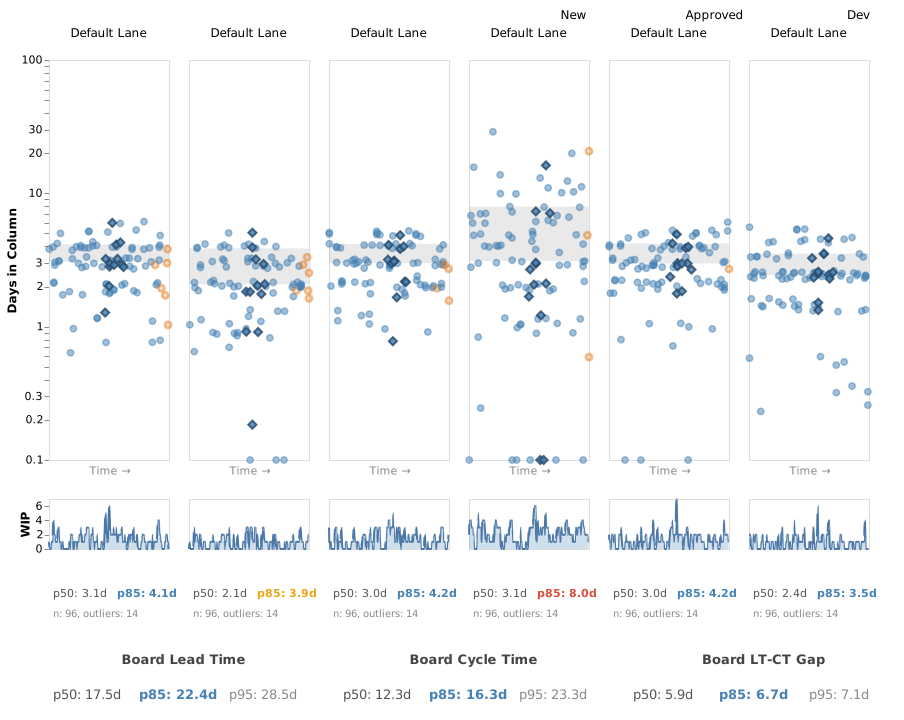
Demo Team closed 96 Product Backlog Items between 2025-04-01 and 2025-10-30, delivering an average of 3.2 items/week with a board-level cycle time p50 of 12.3 days and p85 of 16.3 days. Lead time exceeds cycle time by roughly 5.9–6.7 days (gap ratio 0.34), indicating items spend about a third of their total elapsed time waiting before active work begins. Flow efficiency of 55% is notably strong for a multi-stage board. The Demo Features cohort (12 closed, 0 in-flight) shows a cycle time p50 of 11.4 days and p85 of 14.6 days — both modestly faster than the board baseline, suggesting this work type moves through the system with slightly less friction. Analysis based on 96 items over 213 days (2025-04-01 to 2025-10-30).
Flow Patterns
QA is the dominant predictability risk. QA is the only column with a high (red) variance ratio at 2.56× (p50: 3.1d, p85: 8.0d). This is a predictability problem, not a throughput problem — the median is reasonable, but the tail is nearly 2.6× longer. This suggests QA experiences intermittent blockages or capacity constraints that affect a subset of items disproportionately, making delivery dates hard to forecast.
Little’s Law divergence points to a measurement or batching artifact. The expected cycle time derived from average WIP and throughput is 17.3 days, while actual p50 is 12.3 days — a ratio of 1.40. This may indicate that WIP counting includes items that are not actively flowing (e.g., items parked in wait columns that inflate the average WIP numerator), or that throughput is slightly understated due to batch closures. It is worth the team verifying how WIP is counted across wait vs. work columns.
Friday batch closures suggest end-of-sprint or release-gate behaviour. 39% of all closures occur on Friday (37 of 96 items), with Tuesday as a secondary peak (24%). This pattern is consistent with a team that completes work throughout the week but formally closes items at a sprint boundary or release event. This may artificially compress or inflate cycle time measurements depending on when items are transitioned.
QA carries persistently elevated WIP relative to other columns. Across the 20-week time series, QA’s weekly mean WIP is consistently the highest on the board — ranging from 0.3 to 4.7, with a period average of 2.1 versus 1.0–1.3 for most other columns. This is consistent with QA acting as a recurring accumulation point, which aligns with its high variance ratio and suggests the column may be under-resourced or dependent on external availability.
Throughput is volatile but not declining. Weekly throughput ranges from 0 to 7 items, with several weeks exceeding 50% change week-over-week (e.g., 5→7→6→0→7 in weeks 7–11, and 1→3 in weeks 15–17). The zero-throughput week of 2025-08-12 is notable. However, the overall trend does not show a sustained decline — the final week (2025-10-21) returned to 5 items. This instability is itself a risk to forecast reliability, but does not yet indicate a systemic deterioration.
One at-risk item (item #167) is accumulating age across the entire board. The aging distribution shows 5 of 6 in-progress items are healthy (≤ p50), but item #167 has already spent 20.7 days in QA alone — well above the QA p85 of 8.0 days — and has visible age in New (2.9d), Approved (1.9d), and Dev (1.9d) as well. This single item accounts for the one at-risk flag and is a concrete example of the QA tail risk materialising.
Risks & Recommendations
Risk: QA is an unpredictable bottleneck that will continue to widen cycle time variance. Evidence: QA variance ratio 2.56× (red), average WIP 2.1 (highest on board), p85 of 8.0d vs. p50 of 3.1d. Recommendation: Establish a WIP limit for QA (suggested: 2–3 items) and make QA capacity explicit in sprint planning. In the next retrospective, hover over the 14 outlier dots above the QA p85 line to identify which specific items were delayed — bring those as concrete examples to understand whether the cause is skill availability, environment access, or upstream quality.
Risk: Item #167 is significantly overaged and may be masking a systemic QA dependency. Evidence: 20.7 days in QA against a p85 of 8.0 days; the item has traversed New, Approved, and Dev with normal aging but stalled in QA. Recommendation: Escalate item #167 immediately — identify whether it is blocked, waiting on a specific person, or pending an environment. Use it as a case study to determine whether QA has an unacknowledged dependency (e.g., external sign-off, test environment contention) that should be made visible on the board.
Risk: The 34% pre-work wait (LT-CT gap) represents hidden queue time that is invisible to the team. Evidence: Lead time p50 is 17.5d vs. cycle time p50 of 12.3d; gap ratio of 0.34 means items wait roughly 5.9 days before entering active flow. Recommendation: Review the New and Approved columns — both have 14 outliers each above their respective p85 lines. Consider adding a commitment point policy (e.g., items must meet a Definition of Ready before entering Approved) to reduce pre-work accumulation and make the queue wait visible.
Risk: Friday-heavy closures may be distorting cycle time measurements and masking mid-week blockages. Evidence: 39% of closures on Friday; a single-day spike of 6 items on 2025-08-01. Recommendation: Confirm that items are being closed on the day work is genuinely complete, not on the day of a sprint ceremony or release deployment. If closures are being batched, cycle time measurements will understate true elapsed time for some items and overstate it for others.
Questions for Your Retrospective
Item #167 has been in QA for over 20 days — more than double the p85 for that column. What specifically happened to this item, and is the root cause something that could affect other items currently in flight?
39% of our completed items close on Fridays. Are we genuinely finishing work on Fridays, or are we closing items at sprint ceremonies regardless of when they were actually done — and if so, what does that mean for the cycle time numbers we’re using to make commitments?
QA is the only column with a red variance rating, and its WIP is consistently higher than every other column. Do we have a shared understanding of what “done with QA” means, and is there a specific type of item or dependency that reliably causes QA to take much longer than expected?
Our throughput swung from 7 items one week to 0 the next (early August), and has varied between 1 and 7 throughout the period. What was happening during our lowest-throughput weeks — were those planned (holidays, sprint planning overhead) or unplanned disruptions, and are those causes still present?