A Board That Looks Healthy — Until It Doesn’t
Most of the time, a well-managed feature board produces predictable results. Items enter the pipeline, flow through columns at a steady pace, and exit within a reasonable range. Forecasts work because the historical data they’re built on reflects reality.
Then something disrupts the flow. A key person goes on leave. A compliance audit freezes approvals. An executive drops priority items into the queue. A new strategic initiative floods the pipeline with unplanned work.
This guide follows three features through a disrupted board — showing what the visual tells you, what happens to forecasts, and why the right response is almost never “forecast better.” If terms like p50, p85, variance ratio, or WIP are unfamiliar, the Cycle Time Guide covers them in detail.
The Board
A team manages features through seven columns:
New → Discovery → UX Design → Development → Validation → Mkt/Legal Review → Release → Done
Under normal conditions, features flow through at about 1.5 per week. Each column takes roughly a week at the median. The one exception is Mkt/Legal Review, where external stakeholder signoff introduces inherent unpredictability — even on a healthy board, its p85 is nearly 3× its p50.
Four quarterly cohorts of features are planned: Q1 (6 features), Q2 (12 — the largest batch), Q3 (8), and Q4 (5).
The Disruption
In late May, four things happen simultaneously:
- Development capacity drops to 30% for four weeks — a key team member goes on extended leave and another is cherry-picked for an executive special project.
- Mkt/Legal Review is blocked for three weeks — a compliance audit freezes all stakeholder signoffs.
- Four executive-priority features jump the queue, displacing planned work.
- A surge of new requirements floods Discovery at 2.5× the normal rate for two weeks.
This cluster hits when Q2’s large 12-feature batch is mid-board and Q3’s features are about to enter.
What the Visual Shows
The effects are immediate and concentrated. Mkt/Legal Review’s p85 explodes to 31.9 days — over 4× the p50 of 7.6 days. The scatter plot shows a bimodal pattern: features that passed through before the disruption cluster near the bottom, while features caught in the blocked period stack up to 100+ days.
Development shows the capacity hit with a p85 of 13.0 days. The WIP sparklines across the board tell the story of the ripple — a spike in one column creates pressure upstream and starvation downstream.
Board-level result: Cycle Time p85 reaches 76.3 days. One column’s disruption dominates the entire board’s statistics.
Three Features, Three Fates
The same board, the same disruptions. Three features entered the danger zone at different moments and experienced fundamentally different journeys.
Feature #2048 — “Just Missed It”
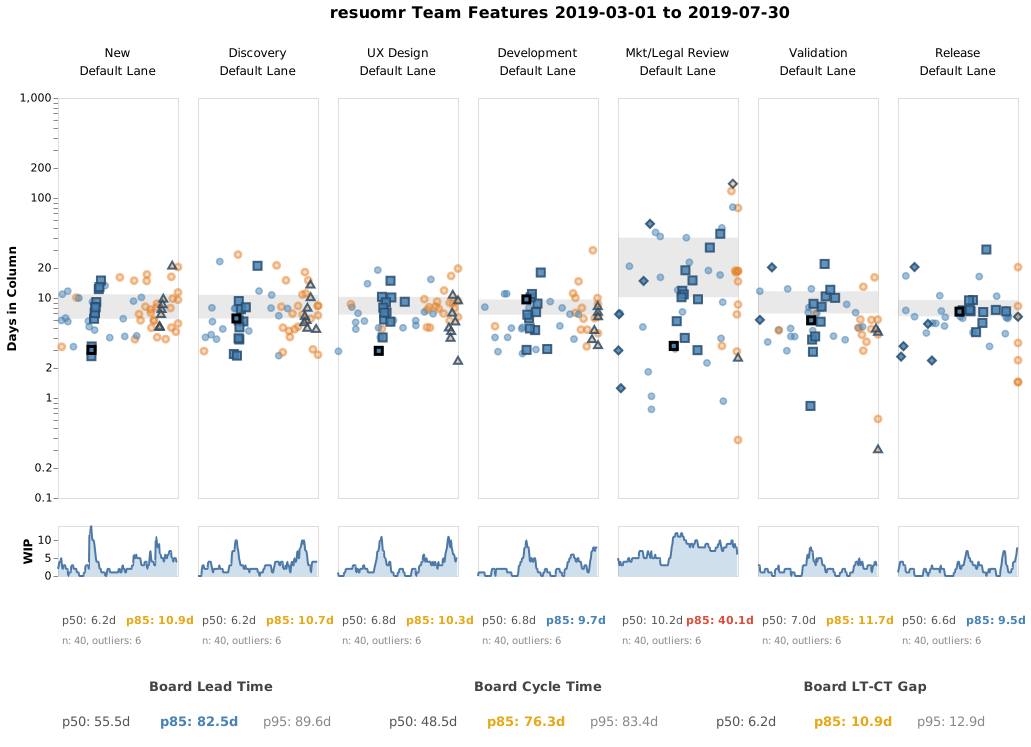
Q2 feature, entered the pipeline in early April. It reached Development just as the capacity dropped — spending 9 days there (long enough to trigger an outlier warning). But it escaped before the worst, passed through Mkt/Legal Review before the compliance audit, and closed on May 17. Look for the blue square with a darker border in each column — that’s #2048’s journey across the board.
The forecast story:
| Date | Column | Forecast p50 | Forecast p85 |
|---|---|---|---|
| Apr 9 | New (day 0) | Jun 4 | Jun 19 |
| Apr 16 | Discovery (day 4) | May 30 | Jun 20 |
| Apr 23 | Development (day 2) | May 20 | Jun 6 |
| Apr 30 | Development (day 9) ⚠ | May 25 | Jun 24 |
| May 7 | Mkt/Legal Review (day 0) | May 21 | Jun 23 |
| May 14 | Release (day 4) | May 16 | May 26 |
| May 17 | Done |
The Development capacity hit is visible — day 9 triggered an outlier warning, and p85 jumped from Jun 6 to Jun 24. But the feature escaped Development before the worst, sailed through Mkt/Legal Review in a day (before the compliance audit), and closed May 17 — 18 days ahead of its original p50 estimate. The disruption touched this feature but didn’t define it.
Feature #2016 — “Trapped”
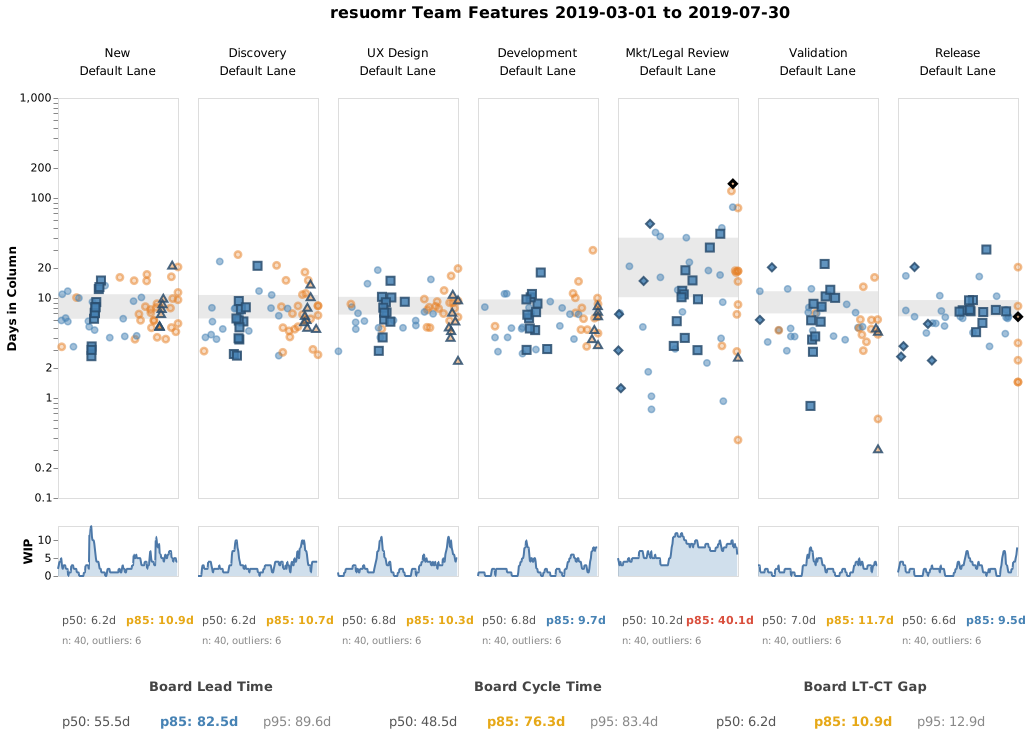
This feature entered Mkt/Legal Review in early March — weeks before anyone knew a compliance audit was coming. It was still there when the audit hit, and it stayed there for 134 days. The orange diamond with a dark border is #2016 — find it sitting alone at the top of the Mkt/Legal Review column, far above every other item.
The forecast story:
| Date | Column | Forecast p50 | Forecast p85 | Note |
|---|---|---|---|---|
| Mar 12 | Mkt/Legal Review (day 5) | Mar 15 | Mar 28 | ⚠ Outlier |
| Mar 19 | Mkt/Legal Review (day 12) | Mar 26 | Apr 4 | ⚠ Outlier |
| Mar 26 | Mkt/Legal Review (day 19) | Apr 1 | Apr 15 | ⚠ Outlier |
| Apr 2 | Mkt/Legal Review (day 26) | Apr 9 | Apr 22 | ⚠ Outlier |
| Apr 9 | Mkt/Legal Review (day 33) | Apr 15 | Apr 25 | ⚠ Outlier |
| Apr 23 | Mkt/Legal Review (day 47) | Apr 28 | May 9 | ⚠ Outlier |
| May 7 | Mkt/Legal Review (day 61) | May 12 | May 17 | ⚠ Outlier |
| May 21 | Mkt/Legal Review (day 75) | May 27 | May 31 | ⚠ Outlier |
| Jun 4 | Mkt/Legal Review (day 89) | Jun 10 | Jun 13 | ⚠ Outlier |
| Jun 18 | Mkt/Legal Review (day 103) | Jun 24 | Jun 27 | ⚠ Outlier |
| Jul 2 | Mkt/Legal Review (day 117) | Jul 8 | Jul 12 | ⚠ Outlier |
| Jul 16 | Mkt/Legal Review (day 131) | Jul 23 | Jul 26 | ⚠ Outlier |
| Jul 23 | Mkt/Legal Review (day 138) | Jul 29 | Aug 2 | ⚠ Outlier |
| Jul 30 | Release (day 6) | Jul 31 | Aug 9 | |
| Aug 6 | Release (day 13) | Aug 13 | Aug 23 | |
| Aug 13 | Release (day 20) | — | — | ⚠ Insufficient data |
| Aug 16 | Done |
This is the pathological case. The feature became an outlier on day 5 and stayed an outlier for over four months. Every week, the forecast said “5-7 more days remaining” — because once you exceed all historical samples for the current column, the forecast can only estimate downstream columns (Release: ~6-10 days). It couldn’t model what it had never seen.
The forecast was perpetually “almost done.” For anyone tracking this feature, that’s worse than no forecast at all — it creates false hope every time you check. The ⚠ outlier warning was the honest signal: I don’t know how long this column will take, but everything after it looks normal.
Even after escaping to Release, the feature spent 20 days there and eventually exceeded the data available for that column too — producing a final “no forecast available” on its last checkpoint before closing.
Feature #2078 — “After the Storm”
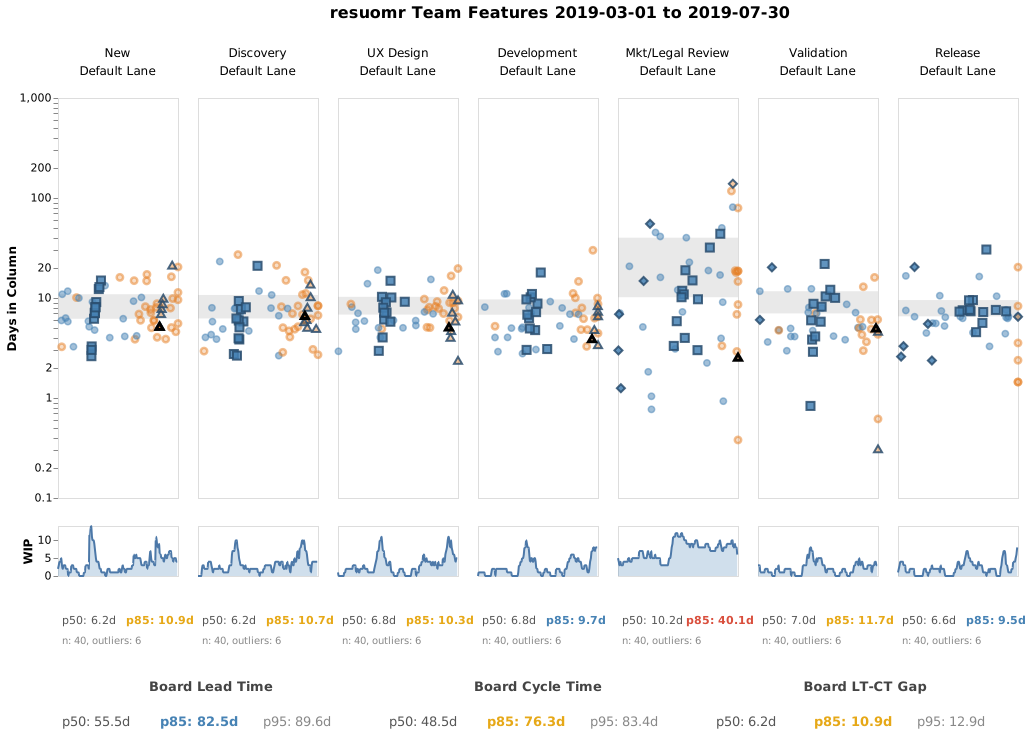
Q3 feature, entered the pipeline in early July — after the disruption’s peak but before the board had fully recovered. The orange triangle with a dark border is #2078 — notice it sits lower in Mkt/Legal Review than in other columns, benefiting from the team’s efforts to clear the post-disruption backlog.
The forecast story:
| Date | Column | Forecast p50 | Forecast p85 |
|---|---|---|---|
| Jul 2 | New (day 0) | Aug 26 | Sep 18 |
| Jul 9 | Discovery (day 2) | Aug 24 | Sep 16 |
| Jul 16 | UX Design (day 2) | Aug 24 | Sep 19 |
| Jul 23 | Validation (day 0) | Aug 17 | Sep 12 |
| Jul 30 | Mkt/Legal Review (day 2) | Aug 16 | Sep 14 |
| Aug 6 | Mkt/Legal Review (day 9) | Aug 24 | Sep 23 |
| Aug 13 | Mkt/Legal Review (day 16) | Sep 7 | Sep 30 |
| Aug 20 | Release (day 4) | Aug 23 | Aug 26 |
| Aug 22 | Done |
The early forecasts were stable — p50 held around Aug 17-26 as the feature moved through healthy columns. Then it entered Mkt/Legal Review and the conditional survival distribution kicked in: each passing day without progress made the forecast worse, not better.
By day 16, p50 had slipped to Sep 7 and p85 to Sep 30 — a 53-day spread. Anyone asking “when will this be done?” got an honest but uncomfortable range.
Then it escaped. The forecast snapped from “maybe late September” to “August 23” in a single checkpoint. Closed on Aug 22 — one day ahead of the Release p50. The original p50 from New (Aug 26) was only 4 days off — but that accuracy was luck, not stability.
What the Three Stories Tell Us
| #2048 (dodged) | #2016 (trapped) | #2078 (after the storm) | |
|---|---|---|---|
| Days in Mkt/Legal Review | ~1 | 138 | ~18 |
| Total cycle time | ~38 days | ~160 days | ~51 days |
| Initial p50 accuracy | 18 days early | Meaningless | 4 days off |
| Forecast behavior | Brief spike, quick recovery | Perpetual “almost done” | Unstable, then snapped back |
The board didn’t treat these features differently. The process did. The same column, the same disruptions — but the features arrived at different times and experienced wildly different results.
The forecast was honest at every checkpoint
It reflected the uncertainty it had evidence for. When a feature was in a healthy column, the forecast was stable and accurate. When it entered a high-variance column, the forecast widened. When it became an outlier, the forecast said so — and switched to downstream-only estimates rather than guessing.
But honesty isn’t the same as usefulness. A forecast that says “5-7 more days” every week for four months is technically correct (the downstream estimate was accurate) while being practically worthless for planning.
The ⚠ outlier warning was the real signal
For Feature #2016, the outlier warning on day 14 was more valuable than any of the numbers that followed it. It said: this item has exceeded all historical precedent for this column. That’s not a forecasting failure — it’s a process alarm. The right response was to investigate why the feature was stuck, not to wait for the forecast to improve.
Variance is the root cause — not the forecast
No amount of forecasting sophistication would have helped these features. The fix was upstream of the forecast: establish a service-level agreement with the compliance team, batch signoffs, or create an escalation path for stalled items.
When the p85 is 4× the p50, the right response isn’t “pick a number between them” — it’s fix the column.
What Would the AI Analysis Say?
The Analyze tab would flag Mkt/Legal Review as the primary recommendation and suggest:
- Review the outlier items above the p85 line — right-click a column header and choose “Copy outliers” to export them, or hover individual dots to identify them — and bring specific examples to the retrospective
- Engage stakeholders on service-level expectations for signoff columns
- Consider WIP limits to prevent items from piling up during disruptions
- Investigate whether the same items appear as outliers across multiple columns (structural problem vs. isolated bottleneck)
The visual tells you where the problem is. The AI analysis tells you what to do about it. The forecast tells you what it costs to leave it unfixed.
This guide uses synthetic data. All work items are simulated — no real team data was used. The board columns, disruption patterns, and forecasts are designed to illustrate flow dynamics at the portfolio level.